

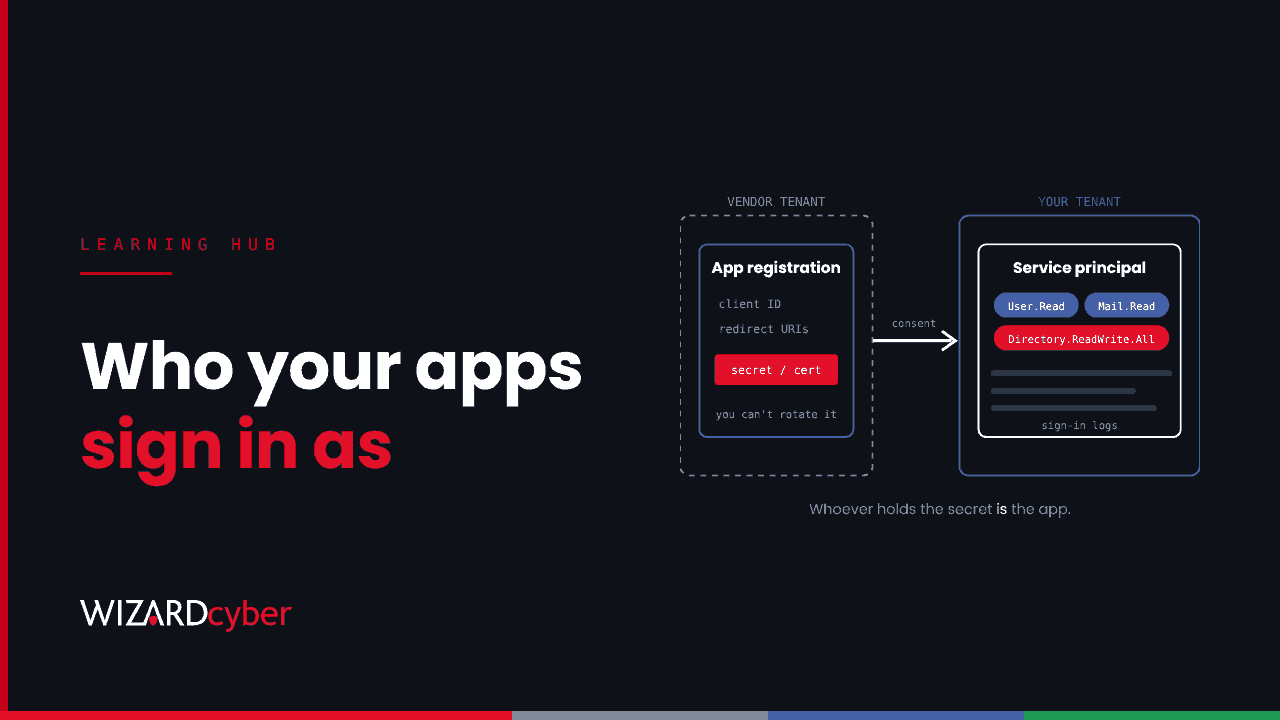
A service principal is the identity an application uses in your Microsoft Entra ID tenant. Users sign in with a user account. Applications, scripts and automation sign in as a service principal. It's the object that holds what the app is allowed to do in your tenant, which roles and permissions it has, and the sign-in logs that show what it's been doing.
Every enterprise application you see in the Entra admin centre is a service principal. That includes Microsoft's own apps, third-party SaaS integrations your users approved, and the automation your own team built. Most tenants have hundreds. Because they don't use passwords or MFA in the normal way, and nobody "logs in" as them interactively, they're easy to forget and attractive to attackers.
App registration vs enterprise application vs service principal
This is the part that confuses most people. There are two objects, and they live in different places.
| App registration (application object) | Enterprise application (service principal) | |
|---|---|---|
| What it is | The app's global definition | The app's local identity in one tenant |
| Where it lives | Only in the tenant where the app was built | In every tenant that uses the app |
| What it holds | Client ID, redirect URIs, requested permissions, and usually the secrets and certificates | Granted permissions, role assignments, who can use it, Conditional Access scope, sign-in logs |
| Who controls it | The app's developer or vendor | The tenant that approved the app |
Think of the app registration as the blueprint and the service principal as the building in your street. If your team builds an app, you'll have both in your tenant. If you approve a third-party SaaS app, only the service principal is in your tenant. The registration, and the credentials that let the app sign in, stay with the vendor.
That last point matters for security. If a vendor's credential is stolen, the attacker can sign in as the app in every customer tenant, and the customers can't rotate the credential themselves. That's what happened in October 2026, when a backup app's identity was used against 173 Microsoft 365 tenants. We covered it in One Trusted App, 173 Tenants.
The three types of service principal
- Application: created when an app registration is used in a tenant, whether your own app or a third party's. This is the most common type.
- Managed identity: a service principal for an Azure resource such as a virtual machine, function app or logic app. Azure manages its credentials for you, so there's no secret for anyone to leak. Use one wherever an Azure workload needs to reach another Microsoft service.
- Legacy: older service principals created before app registrations existed, or by legacy tooling. They have no app registration behind them.
How a service principal signs in
An app signing in as itself uses the OAuth 2.0 client credentials flow. It proves its identity with one of three things:
- A client secret: effectively a password for the app. Easy to set up and easy to leak in code, config files and pipelines.
- A certificate: stronger, because the private key can stay in a key vault or hardware module.
- A federated credential: the app trusts tokens from another identity provider, such as a CI/CD platform, so no long-lived secret is stored at all.
Entra then issues an access token carrying the app's application permissions, such as Mail.Read or Directory.ReadWrite.All. Unlike delegated permissions, these aren't limited by any user's access. Mail.Read as an application permission means every mailbox in the tenant unless you scope it down. For more on scopes and consent, see our guide to OAuth in Microsoft Entra ID.
Why attackers target service principals
- No MFA. A service principal proves itself with a secret or certificate. Whoever holds it is the app.
- Broad, standing permissions. Apps are often granted tenant-wide access for convenience and never reviewed.
- Persistence that survives password resets. An attacker who adds their own secret to an existing app keeps access after every user password is changed. Joint advisory AA26-281A described this technique, covered in our article on hunting AA26-281A in Microsoft 365.
- Less monitoring. Service principal sign-ins are on a separate tab in Entra and in a separate log table, so teams that only watch user sign-ins miss them entirely.
- Privilege escalation. An app with permission to manage other apps or assign roles can be used to grant itself, or another app, far more.
How to secure service principals
- Inventory them and give each one an owner. In Enterprise applications, set the filter to All applications. For each app with meaningful permissions, record who owns it and why it exists. Remove what nobody can explain, starting with apps holding mail, file or directory write permissions.
- Grant the least permission that works. Prefer delegated permissions where a user is involved. Scope Exchange Online application access to the mailboxes each app needs, and Sites.Selected for SharePoint rather than tenant-wide access.
- Control consent. Restrict user consent to low-impact permissions from verified publishers, or turn it off, and use the admin consent workflow so requests are reviewed.
- Get rid of client secrets where you can. Use managed identities for Azure workloads, federated credentials for pipelines and certificates elsewhere. Use application management policies to block new secrets or cap their lifetime.
- Limit who can manage apps. Application Administrator and Cloud Application Administrator can add credentials to apps, so treat them as privileged roles and protect them with Privileged Identity Management.
- Apply Conditional Access for workload identities where it fits. It can block your own single-tenant service principals from signing in outside expected locations. It needs Workload Identities licensing and doesn't cover third-party multi-tenant apps or managed identities.
- Collect the right logs. Send service principal sign-in logs, managed identity sign-in logs, audit logs and Microsoft Graph activity logs to your SIEM. Without Graph activity logs, you can't see what an app actually did with its access.
Monitoring service principals in Microsoft Sentinel
These two queries are a starting point. Tune them to your environment, and add your known automation as exceptions.
New credentials added to apps
Every new secret or certificate should match a change you know about.
AuditLogs
| where TimeGenerated > ago(30d)
| where OperationName == "Add service principal credentials"
     or OperationName has "Certificates and secrets management"
| extend Actor = coalesce(tostring(InitiatedBy.user.userPrincipalName),
                          tostring(InitiatedBy.app.displayName)),
         App = tostring(TargetResources[0].displayName)
| project TimeGenerated, OperationName, Actor, App, Result
| order by TimeGenerated desc
Service principals signing in from somewhere new
Most apps sign in from a stable set of addresses. A new address for an app with powerful permissions deserves a look.
let Baseline = AADServicePrincipalSignInLogs
    | where TimeGenerated between (ago(30d) .. ago(1d))
    | where ResultType == 0
    | distinct AppId, IPAddress;
AADServicePrincipalSignInLogs
| where TimeGenerated > ago(1d)
| where ResultType == 0
| join kind=leftanti Baseline on AppId, IPAddress
| summarize SignIns = count(), Resources = make_set(ResourceDisplayName, 10)
          by ServicePrincipalName, AppId, IPAddress
Frequently asked questions
Is a service principal the same as an enterprise application?
Yes, in practice. "Enterprise application" is the name the Entra admin centre uses for service principals.
What is the difference between a service principal and a managed identity?
A managed identity is a type of service principal tied to an Azure resource. Azure creates and rotates its credentials automatically, so there's no secret to store or leak.
Does disabling a service principal delete it?
No. Setting "Enabled for users to sign-in?" to No stops it getting new tokens, while keeping its permissions and configuration, so you can re-enable it later. Tokens already issued stay valid until they expire. Deleting it removes the consent, and the app has to be approved again.
Can MFA be applied to a service principal?
No. Service principals don't complete MFA. Protect them with strong credentials such as certificates or managed identities, least privilege, Conditional Access for workload identities where it applies, and monitoring.
Where do I see service principal sign-ins?
In the Entra admin centre, under Monitoring, Sign-in logs, on the Service principal sign-ins tab. The default view shows user sign-ins only. In Microsoft Sentinel, they're in the AADServicePrincipalSignInLogs table.
How Wizard Cyber helps
Service principal abuse is quiet: a new secret on an old app, a role assignment nobody requested, a sign-in from an unfamiliar address. Our SOCs are manned 24/7 and watch app and identity activity alongside user sign-ins, endpoints and mail. CYBERSHIELD AI's Investigation Agent works each alert to a verdict, typically in 3m 30s, and on the managed service a senior analyst signs off by default. Our Microsoft security consultancy can help you inventory your apps, cut back permissions and remove the secrets you don't need.
If you'd like to know which apps in your tenant can read every mailbox today, book a demo or talk to our team.