

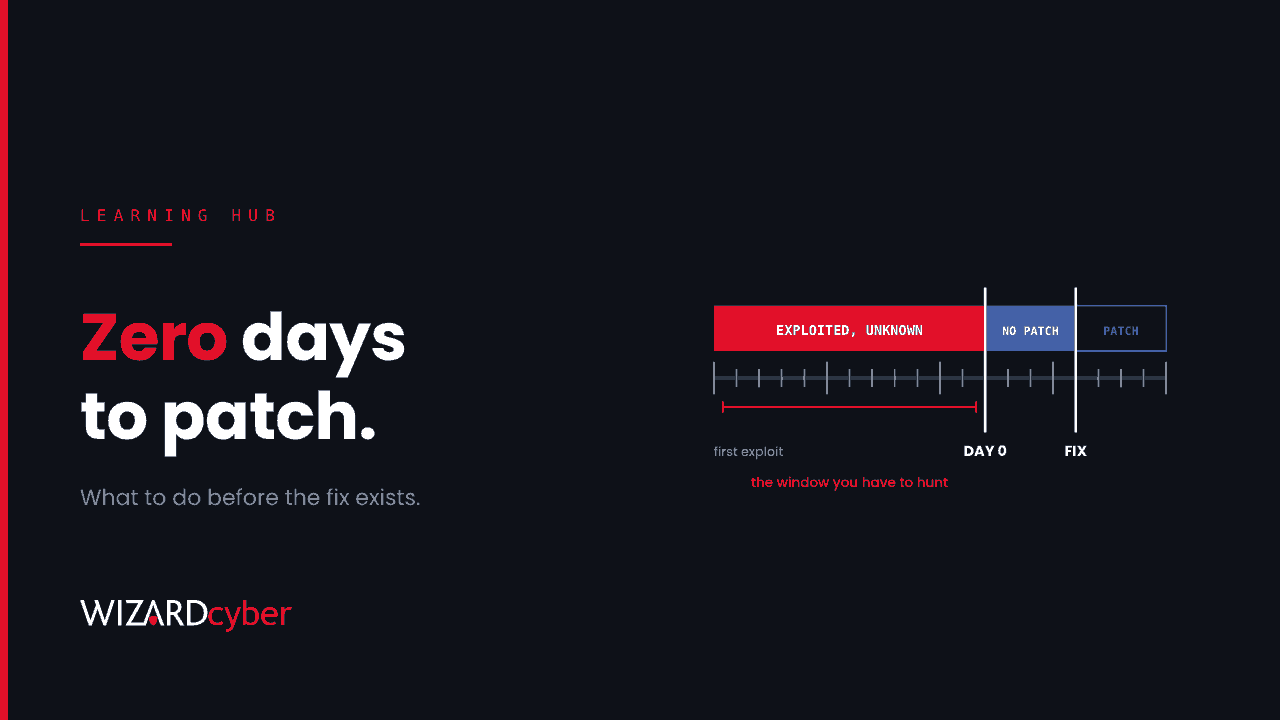
A zero-day attack is an attack that exploits a software vulnerability before the vendor has released a fix for it. The name comes from the defender's point of view: the vendor has had zero days to fix the flaw, so there is no patch to install. Until one arrives, organisations have to rely on reducing exposure, temporary mitigations and spotting the attack while it's happening.
Zero-days used to be rare and expensive, the preserve of intelligence agencies. They're now a regular part of the threat landscape, especially against internet-facing devices such as firewalls, VPN gateways and remote access appliances. This guide explains the terms, how a zero-day plays out, and what you can do before the patch exists.
Zero-day vulnerability, exploit and attack
- Zero-day vulnerability: a flaw that the vendor doesn't know about, or knows about but hasn't fixed.
- Zero-day exploit: the code or technique that takes advantage of that flaw.
- Zero-day attack: the use of that exploit against real targets.
Two related terms come up constantly:
- N-day vulnerability: a flaw that has been disclosed and usually patched, but is still being exploited against systems that haven't applied the fix. Most real-world exploitation is n-day, not zero-day.
- Known Exploited Vulnerabilities (KEV): CISA's public catalogue of vulnerabilities with evidence of exploitation in the wild. A zero-day typically lands on it soon after disclosure, and it's one of the best lists to prioritise against.
The life of a zero-day
- Discovery. An attacker, researcher or broker finds the flaw.
- Exploitation. The attacker uses it quietly, often against a small number of targets to avoid notice. This window can last weeks or months.
- Detection. A victim, security vendor or researcher notices something wrong: an unexpected file on an appliance, odd outbound traffic, a crash.
- Disclosure. The vendor publishes an advisory, sometimes with mitigations before a patch is ready.
- Patch. A fix is released. From this moment it's technically an n-day, and exploitation usually increases as other attackers study the patch.
- Clean-up. Organisations patch, then check whether they were already compromised during the window. This step is often skipped, and it's the one that matters most.
Patching isn't always the end of the story, either. Fixes for exploited bugs are reported broken far more often than others, as we explained in Patched Isn't Fixed.
Recent examples
- Firewall management interfaces. In October 2026 we covered an exploited code injection flaw in a firewall's management interface, where exposure of the admin page to the internet decided who was at risk. See The Firewall's Admin Page Is The Target.
- Remote support appliances. Attackers exploited a remote support appliance before a fix was available, then used its privileged access to reach endpoints downstream. See The Box That Holds Every Key.
- Windows. Microsoft's October 2026 Patch Tuesday fixed a Windows Shell flaw that was already being exploited when the update shipped.
The pattern is clear. Edge devices are favourite targets because they're exposed to the internet, run with high privilege, and often lack the endpoint detection that would catch the follow-on activity.
Why zero-days are hard to defend against
- No signature exists. Tools that look for known exploits or known malicious files have nothing to match on.
- No patch exists. The usual answer to a vulnerability isn't available yet.
- The target is often unmonitored. Firewalls, VPNs and appliances rarely run endpoint protection, and their logs aren't always collected.
- The window is invisible. By the time an advisory appears, the attacker may have been inside for weeks.
What you can do before the patch exists
Reduce exposure
- Keep management interfaces of firewalls, VPNs and appliances off the internet. Reach them through a jump host or a separate management network.
- Know what you expose. An up-to-date external attack surface inventory tells you within minutes whether a new advisory affects you.
- Remove or disable features you don't use. Many appliance zero-days sit in optional components.
Limit what an exploit can reach
- Segment networks so a compromised edge device can't talk freely to domain controllers and servers.
- Give service accounts used by appliances the least privilege they need, and monitor them closely.
- Use phishing-resistant authentication for administrators, so stolen credentials are worth less.
Detect behaviour, not exploits
You can't write a signature for an exploit nobody has seen, but you can spot what attackers do next: new admin accounts, unusual sign-ins from appliance IP addresses, credential dumping, lateral movement, web shells, and data leaving the network. Behaviour-based detection in Microsoft Defender XDR and Sentinel catches these whether the way in was a zero-day or a phished password.
Keep the logs
Send firewall, VPN and appliance logs to your SIEM and keep them long enough to look back. When an advisory says exploitation began two months ago, you'll need two months of data.
The first 72 hours after a zero-day advisory
- Hour 0 to 4: confirm whether you run the affected product and version, and whether the vulnerable component is exposed.
- Hour 4 to 24: apply the vendor's mitigations or workarounds, or take the exposed interface off the internet. Patch as soon as a fix is released.
- Day 1 to 2: hunt for the published indicators and, more importantly, for the behaviour described in the advisory, across the whole period of exposure, not just since disclosure.
- Day 2 to 3: if you find signs of compromise, treat it as an incident. Rotate credentials the device held, check what it could reach, and rebuild rather than clean where the vendor advises it.
- Afterwards: confirm the patch and mitigations hold, and keep the detections in place.
Frequently asked questions
What is the difference between a zero-day and an n-day?
A zero-day has no fix available when it's exploited. An n-day has been disclosed and usually patched, but attackers still use it against systems that haven't been updated.
Can antivirus stop a zero-day attack?
Not by recognising the exploit, because there's no signature for it. Behaviour-based detection can still catch what the attacker does after the exploit succeeds.
How long do zero-days stay unpatched?
It varies from days to months. The exploitation window before disclosure is often longer than the gap between disclosure and the patch.
Who uses zero-day exploits?
State-backed groups, commercial spyware vendors and, increasingly, ransomware and data-extortion gangs, which have used zero-days in file transfer and remote access products to hit many organisations at once.
Is a zero-day the same as a zero-click attack?
No. Zero-click means the victim doesn't have to do anything for the exploit to work. Many zero-days need no user action, but the terms describe different things.
How Wizard Cyber helps
When a zero-day advisory lands, the questions are whether you're exposed and whether you were already hit. Our vulnerability and patch management service tracks exploited vulnerabilities against what you run. Our SOCs are manned 24/7, with senior analysts and incident responders on shift around the clock, so a new advisory becomes a hunt across your estate the same day. CYBERSHIELD AI's Investigation Agent works each alert to a verdict in an average of 3m 30s, or 7m 50s where Advanced Investigation is needed. If you patched something that had been exposed for weeks, a compromise assessment will tell you whether anyone got there first.
To see how we respond when the next zero-day hits, book a demo.