

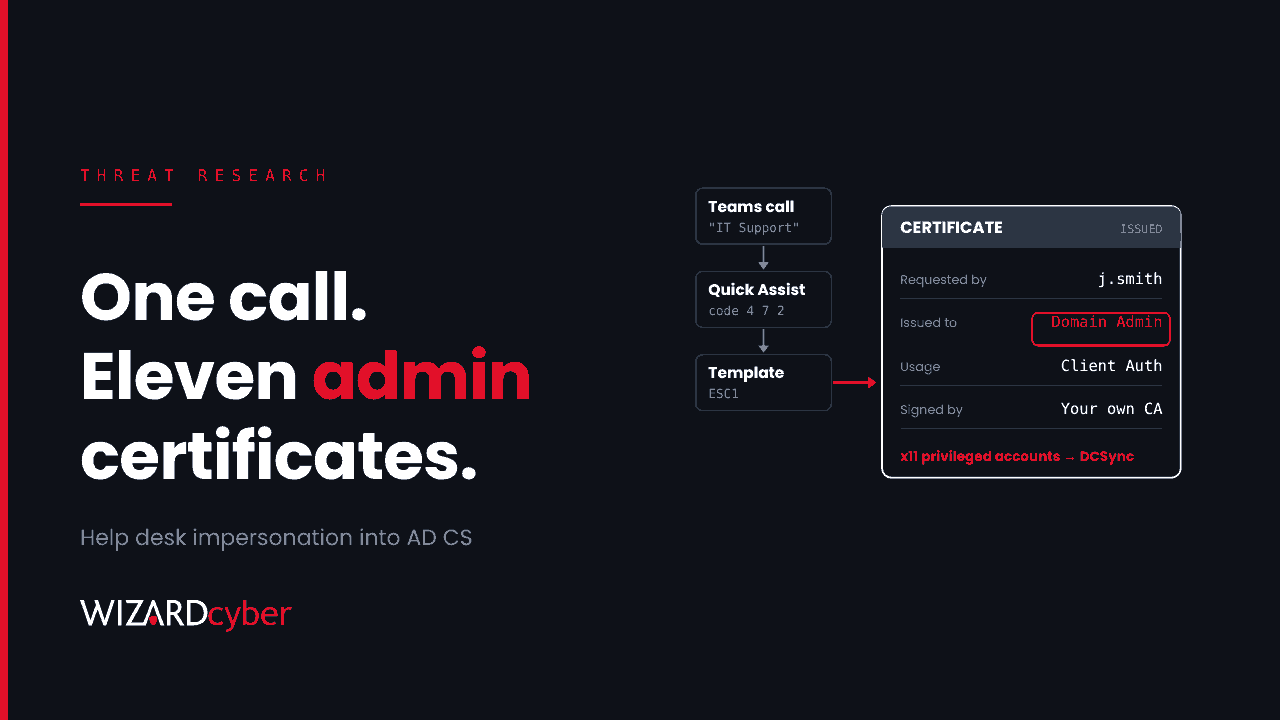
The call comes from "IT Support" in Teams, sometimes just after the user's inbox has filled with spam. The caller offers to fix it and asks for a Quick Assist code. Within a couple of hours, the attacker has requested certificates for eleven privileged accounts from the organisation's own certificate authority. No exploit was needed for any of it.
On 30 October, Microsoft published two intrusion cases that follow this pattern. In both, the way in was social engineering. The way to domain-level control was Active Directory Certificate Services (AD CS), a component many organisations installed years ago and have not looked at since. This post walks through both cases and gives a hunt for each stage.
What happened
Microsoft has not attributed the activity to a named actor. The two cases share a front end and then split.
The common front end: a help desk that isn't
- Contact. Teams messages and calls from external tenants with
onmicrosoft.comnames and support-style display names, sometimes after a burst of mail bombing. - Remote access. The user is talked into opening Quick Assist and reading out the connection code. That gives the attacker hands-on-keyboard access with no malware attachment involved.
- Staging. An archive is dropped in Downloads, extracted to a folder named like a Windows update (
%APPDATA%\KB<number>\), and run with a portable runtime: Python, Java, or a renamed copy of the Bun JavaScript runtime. - Discovery.
ipconfig /all,tasklist, Windows version queries, then LDAPS and SMB connections to domain controllers.
We covered this front end in detail in July in Teams Helpdesk Impersonation: Detecting Cross-Tenant Attacks. What is new is what comes next.
Case 1: ESC1, a template that lets you choose who you are
ESC1 is a misconfigured certificate template that lets the person requesting a certificate supply the subject name, allows client authentication, and can be enrolled in by ordinary users. Anyone who can enrol can ask for a certificate that says they are a domain admin, and the CA will sign it.
In the first wave, the attacker compromised one workstation and obtained certificates for three highly privileged accounts. About 90 minutes later, a second phishing wave against 16 users compromised another machine, and eight more privileged certificates followed. Shortly after, the attacker ran DCSync against a domain controller to pull password hashes.
Defender's automatic attack disruption blocked more than 1,000 SMB access attempts. However, one privileged account had been excluded from automated containment. The attacker used it to reach a file server and ran a renamed copy of Rclone, saved as SearchApp.exe, to send data to an external SFTP server. We look at that exclusion separately in The Account You Excluded From Containment Is The One They Used.
Case 2: ESC8, relaying a domain controller to the CA's web page
In the second case, the attacker used PetitPotam to make a domain controller authenticate to a machine they controlled. They relayed that NTLM authentication to the CA's Web Enrollment pages (/certsrv), which had no relay protection, and requested a certificate from the Domain Controller template. With that certificate they used PKINIT to get a Kerberos ticket as the domain controller itself. Defender raised ESC8 alerts, the customer isolated the workstation, and the attack went no further.
Who is affected
Any organisation running AD CS, which is most organisations with on-premises Active Directory and Wi-Fi, VPN or smart card certificates. The specific risks are:
- templates with "Supply in the request" enabled, a client authentication EKU and broad enrolment rights (ESC1);
- Web Enrollment or Certificate Enrollment Web Service endpoints that accept NTLM over HTTP without Extended Protection for Authentication (ESC8);
- users who can be persuaded to start Quick Assist for a stranger.
If you are not sure whether your templates are vulnerable, our explainer What Is AD CS? covers how to check.
Hunting in Microsoft Defender and Sentinel
These queries are starting points to tune for your estate. Microsoft's post includes its own advanced hunting queries and three SHA-256 hashes for the initial scripts, which you can add as custom indicators.
1. External Teams contact and impersonation signals
CloudAppEvents
| where Timestamp > ago(30d)
| where Application == "Microsoft Teams"
| where ActionType in ("ChatCreated", "TeamsImpersonationDetected", "SecurityRiskInCallDetected")
| extend Raw = parse_json(RawEventData)
| where ActionType != "ChatCreated"
    or tostring(Raw.ParticipantInfo.HasForeignTenantUsers) =~ "true"
| project Timestamp, ActionType, AccountDisplayName, AccountObjectId,
          ChatName = tostring(Raw.ChatName), Raw
New external chats are normal in many businesses. Look for the ones whose display name says "IT", "Support" or "Help Desk" and which come from an onmicrosoft.com tenant.
2. Quick Assist followed by a portable runtime
let qa = DeviceProcessEvents
| where Timestamp > ago(30d)
| where FileName =~ "QuickAssist.exe"
| project DeviceId, DeviceName, QATime = Timestamp;
DeviceProcessEvents
| where Timestamp > ago(30d)
| where FileName in~ ("bun.exe", "java.exe", "javaw.exe", "python.exe", "pythonw.exe")
    or ProcessVersionInfoProductName has "Bun"
| join kind=inner qa on DeviceId
| where Timestamp between (QATime .. QATime + 2h)
| project QATime, Timestamp, DeviceName, AccountName, FileName, FolderPath, ProcessCommandLine
3. Runtimes running from KB-named folders
DeviceProcessEvents
| where Timestamp > ago(30d)
| where FolderPath matches regex @"(?i)\\AppData\\Roaming\\KB\d+\\"
    or ProcessCommandLine matches regex @"(?i)\\AppData\\Roaming\\KB\d+\\"
| project Timestamp, DeviceName, AccountName, FileName, ProcessVersionInfoOriginalFileName,
          ProcessCommandLine, InitiatingProcessFileName
Windows updates do not run from a user's roaming profile. A renamed executable whose version information still says Bun is a strong lead.
4. AD CS, relay, PKINIT and DCSync alerts in one view
AlertInfo
| where Timestamp > ago(30d)
| where Title has_any ("NTLM relay", "Certificate Services", "PKINIT",
                       "Kerberos ticket request", "DCSync")
| join kind=inner (AlertEvidence | where Timestamp > ago(30d)) on AlertId
| summarize Alerts = make_set(Title), Entities = make_set(coalesce(AccountName, DeviceName, RemoteIP))
          by bin(Timestamp, 1h), ServiceSource
Each alert on its own can look like noise. Several in the same hour, involving the same workstation, is the attack in Microsoft's write-up.
5. Certificates issued with a requester-supplied name
This needs Certification Services auditing turned on at the CA (see the hardening section) and the CA's Security log collected in Sentinel. Field layout varies by connector, so adjust the parsing.
SecurityEvent
| where TimeGenerated > ago(30d)
| where EventID in (4886, 4887)
| extend Details = tostring(EventData)
| where Details has_any ("SAN:", "upn=", "dns=")
| project TimeGenerated, Computer, EventID, Account, Details
Compare the requester with the name in the certificate. An ordinary user requesting a certificate for an administrator should never happen.
6. Renamed Rclone
DeviceProcessEvents
| where Timestamp > ago(30d)
| where ProcessVersionInfoOriginalFileName =~ "rclone.exe"
    or (ProcessCommandLine has_any (" copy ", " sync ") and ProcessCommandLine has "sftp")
| where FileName !~ "rclone.exe"
| project Timestamp, DeviceName, AccountName, FileName, FolderPath, ProcessCommandLine
If you find it
- Isolate the workstation where the Quick Assist session happened, and preserve CA, IIS, endpoint and identity logs before cleaning anything.
- Revoke every certificate issued to the attacker and publish an updated CRL. Revocation does not cancel Kerberos tickets already issued, so treat the affected accounts as compromised until their tickets expire or are invalidated.
- If DCSync succeeded, assume the domain is compromised. Reset the krbtgt account twice, with time for replication in between, and rotate passwords for privileged and service accounts.
- Fix the template or endpoint that was abused before you reconnect anything, or the attacker can simply request a new certificate.
- Review every containment exclusion. Case 1 shows what an excluded account can do during an incident.
Hardening
- Restrict Quick Assist. If you do not use it, remove or block it, and use an approved remote support tool that your help desk launches, not the user.
- Tighten Teams external access to the domains you work with, and tell staff that IT will never cold-call them on Teams from an external account.
- Block portable runtimes from user-writable paths with App Control for Business, using signer and original filename rather than the file name.
- Fix ESC1 templates: turn off "Supply in the request" where it is not needed, require manager approval where it is, and remove Domain Users and Authenticated Users from enrolment rights.
- Fix ESC8: remove Web Enrollment and CES if you do not use them. If you do, require HTTPS with Extended Protection for Authentication and disable NTLM, as in Microsoft's KB5005413 guidance.
- Turn on CA auditing so events 4886 and 4887 are written, and send them to Sentinel.
- Use Defender for Identity's AD CS posture assessments, which flag ESC1 and similar template issues.
How a managed SOC helps
- Correlating weak signals. A Teams chat, a Quick Assist session and an AD CS alert land in three different consoles. Our SOCs are staffed 24/7 and investigate them as one incident, with a full report for every investigation and senior analyst sign-off by default on the managed service.
- Hunting for what was missed. Complete and Command include a threat hunting allocation, which covers sweeps like the ones above across your estate.
- Compromise assessment. If you think certificates have already been misused, our consultants can review your CA and the identity evidence around it.
If you want these hunts run against your environment, talk to our team.