

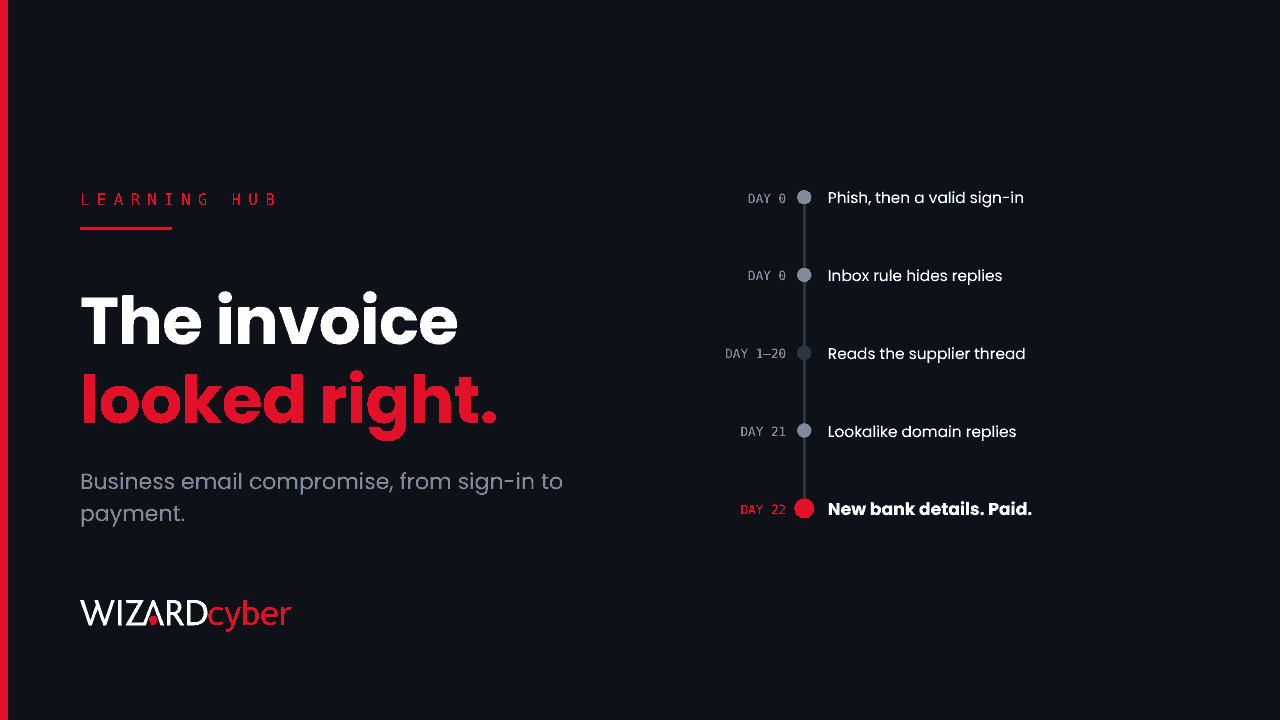
Business email compromise (BEC) is a fraud in which an attacker uses a hijacked or impersonated business email account to trick someone into sending money or sensitive information. The classic version is a supplier invoice with new bank details, or an "urgent" payment request that seems to come from a director. There's often no malware and no malicious link in the final email. It works because it looks like ordinary business.
It is also the most expensive kind of cybercrime most organisations face. In the FBI's 2025 Internet Crime Report, reported BEC losses came to around $3 billion in that one year, from US complaints alone.
How a business email compromise attack works
Most BEC attacks against Microsoft 365 organisations follow the same shape.
- Get into a mailbox. The attacker phishes a password, often with a fake Microsoft sign-in page or an adversary-in-the-middle kit that also captures the MFA session. Password spraying and reused passwords from earlier breaches also work against accounts without MFA. See What Is Password Spraying?
- Hide. They create inbox rules that move or delete replies containing words like "invoice", "payment" or "bank", so the real owner doesn't see the conversation. Some register their own MFA method or grant an app access to the mailbox so they keep access after a password reset.
- Watch. They read email for days or weeks, learning who pays whom, when invoices are due, how people write and which deals are in progress.
- Strike. At the right moment they reply in an existing thread, either from the compromised mailbox or from a lookalike domain one character different from the real one, with new bank details or an urgent request.
- Cash out. The money goes to an account controlled by the fraudsters and is moved on quickly, which is why recovering it gets much harder after the first day or two.
Common types of BEC
- Supplier or invoice fraud. A real supplier's mailbox is compromised, or impersonated, and asks customers to pay a new account.
- CEO or executive fraud. An email that seems to come from a senior leader asks finance to make an urgent, confidential payment.
- Payroll diversion. HR receives a request, apparently from an employee, to change their salary bank details.
- Solicitor and property fraud. Attackers intercept conveyancing emails and redirect deposits or completion funds.
- Data theft. The goal is information rather than money, such as staff tax records or customer data that can be sold or used in further fraud.
BEC vs phishing
Phishing is usually how BEC begins, but the two are different. A phishing email tries to get you to click a link or open a file. A BEC email usually contains neither. It relies on trust, timing and a believable request, which is why email filters that look for malicious links and attachments often miss it.
Warning signs in Microsoft 365
Signs in the mailbox
- New inbox rules that delete, move or mark messages as read, especially rules that act on payment-related words or move mail to obscure folders such as RSS Feeds or Archive.
- Forwarding to external addresses that nobody set up.
- Sent items the user doesn't recognise, or sent items that have been deleted.
- Replies in existing threads coming from a domain that is almost, but not quite, the real one.
Signs in identity logs
- Successful sign-ins from unusual locations or hosting providers, often shortly after a phishing email was delivered.
- A new MFA method registered, or an app granted mail access, that the user didn't request.
- One account signed in from two places that are too far apart at nearly the same time.
Starter KQL queries for Microsoft Sentinel
These are starting points. Run them over a few weeks, review what's normal in your tenant and add exceptions before turning them into alerts.
Suspicious inbox rules
OfficeActivity
| where TimeGenerated > ago(30d)
| where Operation in ("New-InboxRule", "Set-InboxRule", "UpdateInboxRules")
| extend Params = tostring(Parameters)
| where Params has_any ("DeleteMessage", "MoveToFolder", "MarkAsRead", "ForwardTo", "RedirectTo")
| where Params has_any ("invoice", "payment", "bank", "remittance", "transfer", "RSS", "Archive")
| project TimeGenerated, UserId, ClientIP, Operation, Params
Payment requests from first-time sender domains
This uses Microsoft Defender for Office 365 data to find inbound emails about payments from domains that haven't emailed you in the previous 30 days, a common sign of a lookalike domain.
let KnownDomains = EmailEvents
| where Timestamp between (ago(31d) .. ago(1d))
| where EmailDirection == "Inbound"
| distinct SenderFromDomain;
EmailEvents
| where Timestamp > ago(1d)
| where EmailDirection == "Inbound"
| where SenderFromDomain !in (KnownDomains)
| where Subject has_any ("invoice", "payment", "bank details", "remittance", "overdue", "updated account")
| project Timestamp, SenderFromAddress, SenderFromDomain, RecipientEmailAddress, Subject, DeliveryAction
How to prevent business email compromise
Technical controls
- Require MFA for everyone, and phishing-resistant MFA for high-risk roles. Passkeys and certificate-based authentication resist adversary-in-the-middle phishing. Finance, payroll and executives are prime targets.
- Block legacy authentication with Conditional Access, because older protocols can't do MFA.
- Disable automatic external forwarding in Exchange Online outbound spam policies, and allow exceptions only where there's a business need.
- Publish SPF, DKIM and DMARC for your own domains and move DMARC towards enforcement, so attackers can't send email that appears to come from your exact domain.
- Turn on impersonation protection in Microsoft Defender for Office 365 for your executives, finance staff and key suppliers' domains.
- Restrict app consent so attackers can't keep mailbox access through an app after a password reset. See What Is OAuth?
Process controls
- Verify bank detail changes out of band. Call the supplier or employee on a number you already hold, never one from the email requesting the change.
- Require two people to approve new payees and large payments.
- Treat urgency and secrecy as red flags. Make it normal, and safe, for finance staff to slow down and check a request from a senior leader.
- Tell your suppliers how you'll communicate changes, so they know to question an email that doesn't follow that process.
What to do if you've been hit by BEC
- Call your bank immediately and ask them to recall the payment. Speed matters more than anything else.
- Report it. In England, Wales and Northern Ireland, report to Report Fraud, the service that replaced Action Fraud. In Scotland, contact Police Scotland on 101. Elsewhere, use your national reporting service.
- Secure the account. Reset the password, revoke sessions and refresh tokens, and remove any MFA methods, app consents, inbox rules and forwarding the attacker added.
- Work out the scope. Check what the attacker read and sent, which other accounts signed in from the same addresses, and whether suppliers or customers received fraudulent emails from you. Warn them if so.
- Close the gap that let them in, whether that was a missing MFA requirement, legacy authentication or a process that allowed an unverified bank change.
Frequently asked questions
What does BEC stand for?
Business email compromise. It's sometimes called email account compromise (EAC) when the fraud targets individuals rather than businesses.
Does MFA stop business email compromise?
It stops many attacks, but not all. Adversary-in-the-middle phishing kits can steal the session after MFA is completed. Phishing-resistant methods such as passkeys, plus monitoring for suspicious sign-ins and inbox rules, close most of that gap.
Why don't email filters catch BEC?
The final fraudulent email often contains no links or attachments, may come from a genuine compromised mailbox, and reads like normal business correspondence. That's why process controls such as call-back verification matter as much as technology.
Can you get money back after a BEC payment?
Sometimes, if you act very quickly. Contact your bank as soon as you discover the fraud. The chance of recovery drops sharply once the money has been moved on.
Is BEC the same as invoice fraud?
Invoice fraud is one common type of BEC. BEC also includes executive impersonation, payroll diversion and data theft.
How Wizard Cyber helps
BEC leaves traces across identity and email, such as a sign-in from a new location, a new inbox rule or an unfamiliar sender domain, often days before the fraudulent payment request. Our SOCs are manned 24/7, and CYBERSHIELD AI's Investigation Agent links those signals into one incident and works it to a verdict, typically in 3m 30s. On the managed service, a senior analyst signs off by default.
If you'd like to know whether your tenant would catch a mailbox takeover before the invoice arrives, book a demo or talk to our team.