

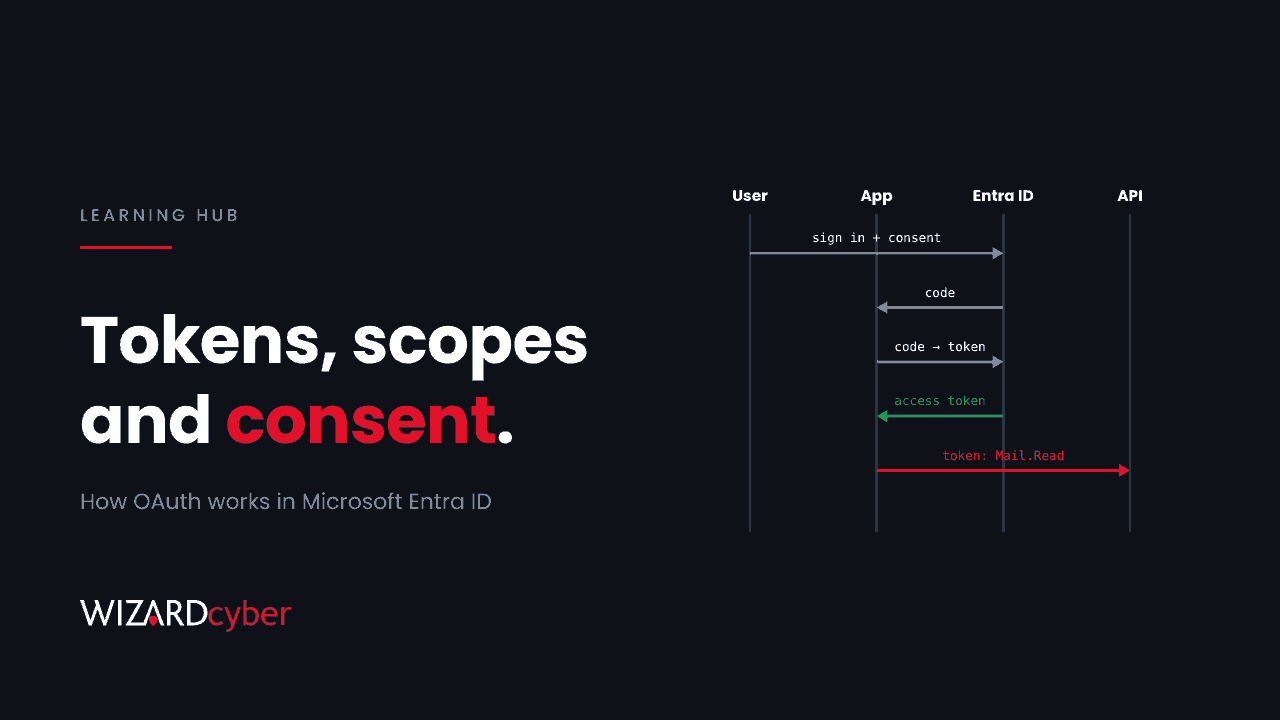
OAuth is an open standard that lets an application access your data in another service without being given your password. When you let a scheduling app read your Outlook calendar, you're using OAuth. You sign in to Microsoft, approve what the app may do, and Microsoft gives the app a token that allows exactly that, for a limited time. The app never sees your password, and you can withdraw its access without changing it.
The current version, OAuth 2.0, is defined in RFC 6749. It's how almost every Microsoft 365 integration, mobile app and AI assistant gets access to your data. That also makes it one of the most useful tools an attacker has. If they can get an app approved, or a token issued, they get access that doesn't need your password and can survive a password reset.
OAuth vs OpenID Connect vs SAML
| What it answers | What you get | |
|---|---|---|
| OAuth 2.0 | What is this app allowed to do? | An access token for an API |
| OpenID Connect | Who is this user? | An ID token describing the user, built on top of OAuth |
| SAML | Who is this user? (older, XML-based) | A signed assertion for single sign-on |
Strictly, OAuth is about authorisation, not authentication. In practice, Microsoft Entra ID uses OAuth 2.0 and OpenID Connect together, so one sign-in produces both an ID token and an access token.
The four parties in OAuth
- Resource owner: you, the person whose data it is.
- Client: the application that wants access, such as a CRM add-in or an AI assistant.
- Authorisation server: the service that checks who you are and issues tokens. In Microsoft 365, that's Microsoft Entra ID.
- Resource server: the API holding the data, such as Microsoft Graph or Exchange Online.
How OAuth works in Microsoft Entra ID
The most common pattern is the authorisation code flow, normally with PKCE (Proof Key for Code Exchange), an extra check that stops an intercepted code being used by someone else.
- The app sends you to Entra's authorisation endpoint,
login.microsoftonline.com/.../oauth2/v2.0/authorize, with its client ID, the scopes it wants and a redirect URI. - You sign in, passing MFA and Conditional Access as usual.
- If the app hasn't been approved before, you see a consent screen listing what it wants to do.
- Entra sends your browser back to the redirect URI with a short-lived authorisation code.
- The app exchanges the code for an access token, and usually a refresh token.
- The app calls the API with the access token. When the token expires, it uses the refresh token to get a new one, without asking you again.
Other flows exist for other situations. The client credentials flow lets an app act as itself, with no user, using a secret or certificate. The device code flow lets you sign in on a second device for things like TVs and command-line tools.
Tokens and how long they last
- Access tokens are what the API checks. In Entra ID they last between 60 and 90 minutes by default.
- Refresh tokens get new access tokens. By default they're valid for up to 90 days and are renewed as they're used, so an active app can keep access indefinitely.
- ID tokens tell the app who you are. They aren't used to call APIs.
Scopes and permissions
Scopes are the specific permissions an app asks for, such as User.Read, Mail.Read, Files.ReadWrite.All or offline_access (which is what gets it a refresh token). In Entra there are two kinds:
- Delegated permissions let the app act on behalf of a signed-in user, and never more than that user can do.
- Application permissions let the app act as itself across the whole tenant, with no user involved.
Mail.Readas an application permission means every mailbox, unless you scope it down.
Consent: user and admin
Someone has to approve the permissions. Users can consent to some delegated permissions for themselves, depending on your tenant's settings. Application permissions and high-impact delegated permissions need an administrator to grant admin consent for the whole organisation. Once granted, consent persists until someone removes it.
App registrations vs enterprise applications
This trips up most people new to Entra. An app registration is the application's definition: its client ID, redirect URIs, secrets and requested permissions. It lives in the tenant of whoever built the app. An enterprise application (technically a service principal) is that app's presence in your tenant: who can use it, what it's been consented to and its sign-in logs. A third-party app that your users consented to appears in your tenant as an enterprise application, while its registration stays in the vendor's tenant.
How attackers abuse OAuth
Consent phishing
The attacker registers an app with a convincing name and logo, then sends a link that leads to a real Microsoft consent screen. If the user clicks Accept, the attacker's app gets a token for the user's mail or files. It needs no password and no MFA bypass, and resetting the user's password doesn't remove the grant.
Redirect abuse
Attackers craft authorisation links to the genuine Microsoft sign-in page that deliberately fail, so Entra redirects the user to the attacker's registered redirect URI. The link passes the "check where it goes" test because it really does go to Microsoft first. We cover current campaigns in Hunting OAuth Redirect Abuse In Entra ID.
Device code phishing
The attacker starts a device code sign-in, sends the user the code with a plausible story, and the user enters it at the real Microsoft page. The tokens go to the attacker's session. Microsoft documented a state-linked campaign using this technique, Storm-2372, in February 2025.
Token theft and replay
Adversary-in-the-middle phishing kits sit between the user and Microsoft, pass through the MFA prompt and capture the session cookies and tokens that come back. Malware on a device can steal tokens from the browser or local cache too.
Over-privileged apps and leaked secrets
A legitimate app with tenant-wide application permissions and a long-lived client secret is a prize. Anyone who finds the secret in a code repository or config file can read mail without signing in as anyone. Joint advisory AA26-281A described exactly this, covered in our article on hunting AA26-281A in Microsoft 365.
How to secure OAuth in Microsoft Entra ID
- Restrict user consent. Allow users to consent only to apps from verified publishers requesting low-impact permissions, or not at all.
- Turn on the admin consent workflow. Users can request an app they need, and a reviewer approves or rejects it with the permissions in front of them.
- Review existing grants and enterprise apps. Remove apps nobody uses or owns, and look hardest at mail, file and directory permissions. App governance in Microsoft Defender for Cloud Apps helps here.
- Prefer certificates and managed identities to client secrets for your own apps, and limit Exchange Online application permissions to the mailboxes each app needs.
- Block the device code flow with Conditional Access's authentication flows condition for everyone who doesn't need it.
- Use phishing-resistant MFA and token protection where supported, to make stolen tokens harder to replay.
- Send the right logs to your SIEM. That means audit logs for consent and app changes, plus non-interactive and service principal sign-in logs.
A starter KQL query: new consents to high-impact permissions
This query for Microsoft Sentinel surfaces recent consents that include powerful permissions. It's a starting point. Adjust the permission list and add known business apps as exceptions.
let Risky = dynamic(["Mail.Read", "Mail.ReadWrite", "Mail.Send", "Files.ReadWrite.All",
                     "Sites.ReadWrite.All", "full_access_as_app", "Directory.ReadWrite.All",
                     "offline_access"]);
AuditLogs
| where TimeGenerated > ago(30d)
| where OperationName in ("Consent to application", "Add delegated permission grant",
                          "Add app role assignment to service principal")
| extend App = tostring(TargetResources[0].displayName),
         Actor = coalesce(tostring(InitiatedBy.user.userPrincipalName),
                          tostring(InitiatedBy.app.displayName)),
         Detail = tostring(TargetResources[0].modifiedProperties)
| where Detail has_any (Risky)
| project TimeGenerated, OperationName, App, Actor, Detail
| order by TimeGenerated desc
What to do if a malicious OAuth app gets in
- Disable the enterprise application in your tenant so it can't get new tokens.
- Remove its consent grants and app role assignments.
- Revoke the affected users' refresh tokens and sessions.
- Review what it accessed using mailbox audit logs (including MailItemsAccessed) and SharePoint and OneDrive activity.
- Look for the same app in other users' grants, and report it to Microsoft.
Frequently asked questions
Is OAuth secure?
The protocol is sound and far safer than giving apps your password. The risks come from how it's used: users consenting to apps they shouldn't, apps holding more permissions than they need, and tokens being stolen or phished.
Does resetting a password remove an OAuth app's access?
Not necessarily. A consent grant persists until it's removed. Revoking refresh tokens forces delegated apps to obtain new ones, but you should also remove the grant itself. Apps using application permissions don't depend on any user's password at all.
Does MFA protect against OAuth attacks?
Partly. MFA protects the sign-in, but in consent phishing the user completes MFA themselves and then approves the app. In token theft, the attacker steals what comes after MFA. Consent controls and token protection matter as much as MFA.
What is the difference between delegated and application permissions?
Delegated permissions let an app act as a signed-in user, limited to what that user can access. Application permissions let an app act as itself across the tenant without any user, and always need admin consent.
Where do I see which apps users have consented to?
In the Microsoft Entra admin centre, under Enterprise applications. Each app's Permissions page shows user and admin consents, and the audit logs record each consent event.
How Wizard Cyber helps
OAuth abuse is quiet. A consent here, a new service principal sign-in there, a mailbox read at an odd hour. Our SOCs are manned 24/7 and watch consent events, app changes and sign-ins alongside mail and endpoint activity. CYBERSHIELD AI's Investigation Agent brings them together into a single verdict, typically in 3m 30s, and on the managed service a senior analyst signs off by default. Our Microsoft security consultancy can help you tighten consent settings and clean up the apps already in your tenant.
If you'd like to know which apps can read your organisation's mail today, book a demo or talk to our team.