
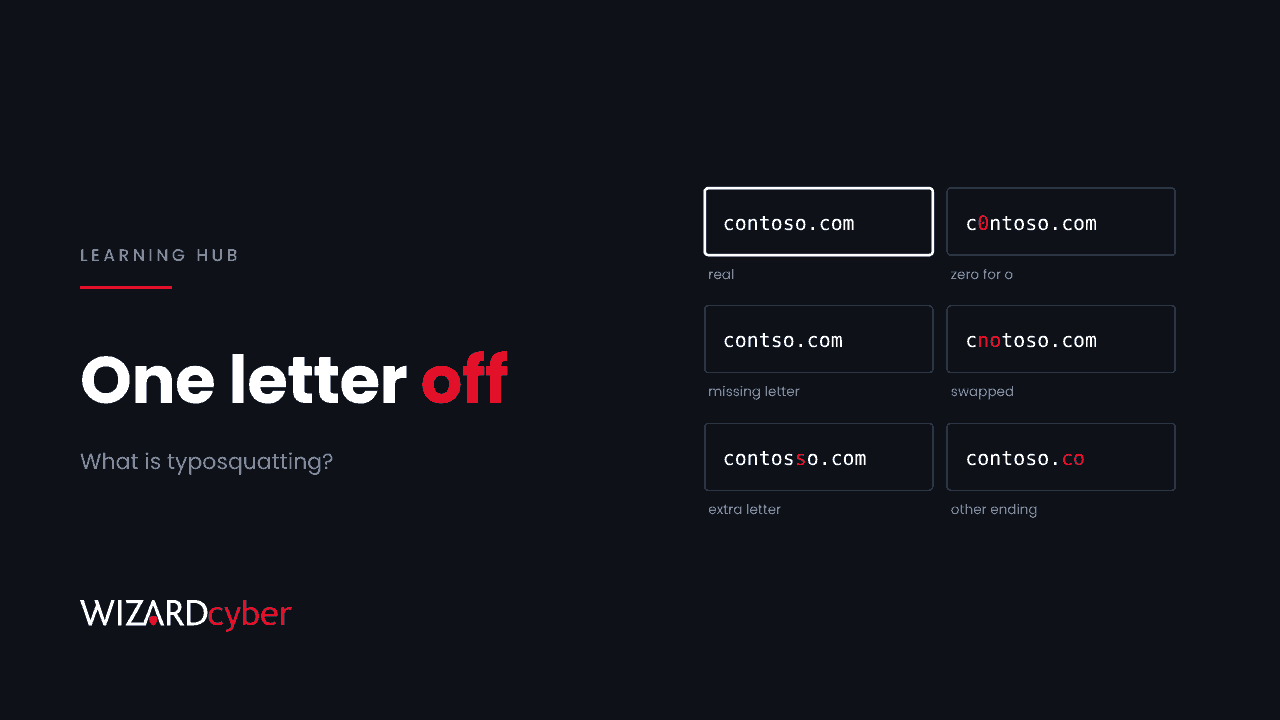
Typosquatting is registering a domain that looks like a real one, so that people who mistype an address, or don't look closely at a link, end up on the attacker's site instead. A missing letter, two letters swapped, a zero in place of an "o", or a different ending such as .co instead of .com is enough. The lookalike might host a fake sign-in page, malware, an unwanted app, or simply advertising. This guide explains how typosquatting works, what it's used for today, and what you can do about it in a Microsoft environment.
How typosquatting works
Most typosquatted domains rely on ordinary mistakes. Using a made-up company, Contoso, as the example:
- Omission: a letter goes missing, as in
contso.com. - Insertion: a letter is doubled or added, as in
contosso.com. - Transposition: two letters swap places, as in
cnotoso.com. - Substitution: a neighbouring key is hit instead, as in
contoao.com. - Lookalike characters: a zero for an "o" or "rn" for "m", as in
c0ntoso.com. Some attackers also use characters from other alphabets that look identical on screen. These are called homoglyphs. - Different ending: the same name under another top-level domain, as in
contoso.coorcontoso-login.com.
Some of these catch people who type an address by hand. Others are aimed at people who see a link in an email or a search result and don't read it letter by letter. Both work because the brain reads familiar words as shapes.
Typosquatting is sometimes called URL hijacking. It overlaps with brand impersonation and domain spoofing, which are broader terms for any attempt to pass off a site or email as someone else's.
What attackers do with lookalike domains
Phishing pages
The most direct use: a lookalike of your sign-in page, a supplier's invoicing portal or a well-known service, linked from an email. Because the domain is nearly right, the link survives a quick glance. Many of these pages are built with phishing kits that can relay MFA prompts in real time.
Business email compromise
Attackers register a domain one character away from a supplier's or your own, then send invoices or payment change requests from it. Email authentication such as DMARC doesn't help here, because the lookalike domain can have perfectly valid SPF, DKIM and DMARC records of its own. See our guide to business email compromise.
Malware and unwanted software
Lookalikes of popular tools can serve fake installers, ClickFix "verification" pages that trick people into pasting commands, or browser extensions that change settings.
Advertising and resale
Many typosquatted domains are simply parked and earn money from ads, or wait to be sold. Parked domains can switch to something malicious at any time, and some route visitors through traffic brokers that decide what each person sees.
A recent example: fake AI tool sites
In November 2026, security researchers described 186 lookalike domains covering 27 popular AI services, some registered as early as 2023 (also covered by The Hacker News). The domains used exactly the mistakes listed above: a letter missing, two letters swapped, a zero for an "o", a word spelled by sound. Visitors were passed through a gate that fingerprinted their browser and location before deciding what to show them, which helps the operators hide from automated scanners.
Windows visitors could be shown a fake "human verification" page that told them to paste a command into the Run dialog, which downloaded and ran a PowerShell script. Others were sent to "security check" pages that led to a Microsoft Store app, which the researchers say could change the browser's search engine while the user was idle and install extensions. A third route installed browser extensions that silently changed the default search provider, with about 972,000 declared users across the listings still live.
The lesson for organisations is that staff now type the names of new tools every day, and many of those tools have names that are easy to mistype. Each one is a new set of lookalike domains.
How to protect your users
1. Give people a known route to the tools they use
Publish approved links for the services your organisation uses, as managed browser bookmarks, intranet links or app launcher entries. People who click a known link don't type the address.
2. Use the protections you already have in Microsoft 365 and Windows
- Safe Links in Defender for Office 365 checks URLs when they're clicked, not just when the email arrives. Make sure it covers every user, including in Teams and Office apps.
- Impersonation protection in Defender for Office 365 anti-phishing policies can flag mail from domains that look like yours or your key partners'. Add your main suppliers to the protected domains list.
- Microsoft Defender SmartScreen in Edge and Windows blocks known malicious sites and downloads.
- Web content filtering and custom indicators in Defender for Endpoint let you block categories of sites and specific domains across managed devices, in any browser.
3. Control the browser
Set the default search provider and an extension allowlist through browser policy (Intune or Group Policy), so a lookalike site can't quietly change either. Review installed extensions periodically, including ones that request no permissions.
4. Break the paste-and-run route
Many lookalike pages now end in a ClickFix prompt. Limit who can run PowerShell, consider restricting the Run dialog for standard users, and alert on hidden PowerShell started from explorer.exe, especially with -ep bypass or a download from a raw IP address.
5. Watch for lookalikes of your own domain
Register the most obvious variants of your own domain, and monitor new domain registrations and certificate transparency logs for close matches. A new certificate for a lookalike of your domain is often the first sign of a campaign against your customers or staff. Our article on rogue certificates for real brands covers what certificate logs can tell you.
6. Teach the habit, not just the rule
Telling people to "check the URL" works better with specific examples. Show staff real lookalikes of tools they use, and make it easy to report a suspicious link.
Detecting typosquatting in your environment
If you use Defender for Endpoint, a simple starting point is to look for visits to domains that are close to the services you care about. This query flags domains that contain a protected name with small changes. Treat it as a starting point and tune the list.
let protected = dynamic(["contoso", "fabrikam"]);   // your brand and key suppliers
DeviceNetworkEvents
| where Timestamp > ago(7d)
| where isnotempty(RemoteUrl)
| extend Host = tostring(parse_url(strcat("https://", RemoteUrl)).Host)
| extend p = protected
| mv-expand p to typeof(string)
| where Host contains substring(p, 0, 4) and not(Host endswith strcat(p, ".com"))
| summarize Hits = count(), Devices = dcount(DeviceId) by Host, p
| order by Hits desc
For email, the EmailEvents table records sender domains, so a similar comparison against your supplier list will surface lookalike senders.
Frequently asked questions
Is typosquatting illegal?
Registering a domain isn't illegal in itself, but using one to deceive people, steal credentials or infringe a trade mark usually is. Brand owners can bring complaints under the UDRP process or, for .uk domains, Nominet's dispute resolution service.
Does DMARC stop typosquatting?
No. DMARC stops attackers sending email that claims to come from your exact domain. A lookalike domain is a different domain with its own records, so DMARC on yours has no effect on it.
Should we buy every possible lookalike of our domain?
Not every one, as there are too many. Register the most obvious variants and the ones attackers have used against you before, and monitor for the rest.
What's the difference between typosquatting and phishing?
Typosquatting is a technique for getting someone to a fake site. Phishing is the wider attack, usually an email or message that tricks someone into handing over credentials or money. Many phishing campaigns use typosquatted domains, but not all.
Can a lookalike domain have a valid HTTPS padlock?
Yes. Certificates are easy to get for any domain someone owns. The padlock means the connection is encrypted, not that the site is the one you meant to visit.
How Wizard Cyber helps
Wizard Cyber's SOCs are staffed 24/7 and have run Microsoft Sentinel since 2019. We watch for lookalike senders, clicks on suspicious links and the endpoint activity that follows, and a senior analyst confirms what needs action. Our MXDR for Microsoft service brings email, identity and endpoint signals together, and our Microsoft security consultancy can help you tune Safe Links, impersonation protection and browser policy.
Want to know how exposed your users are to lookalike domains? Talk to our team.