
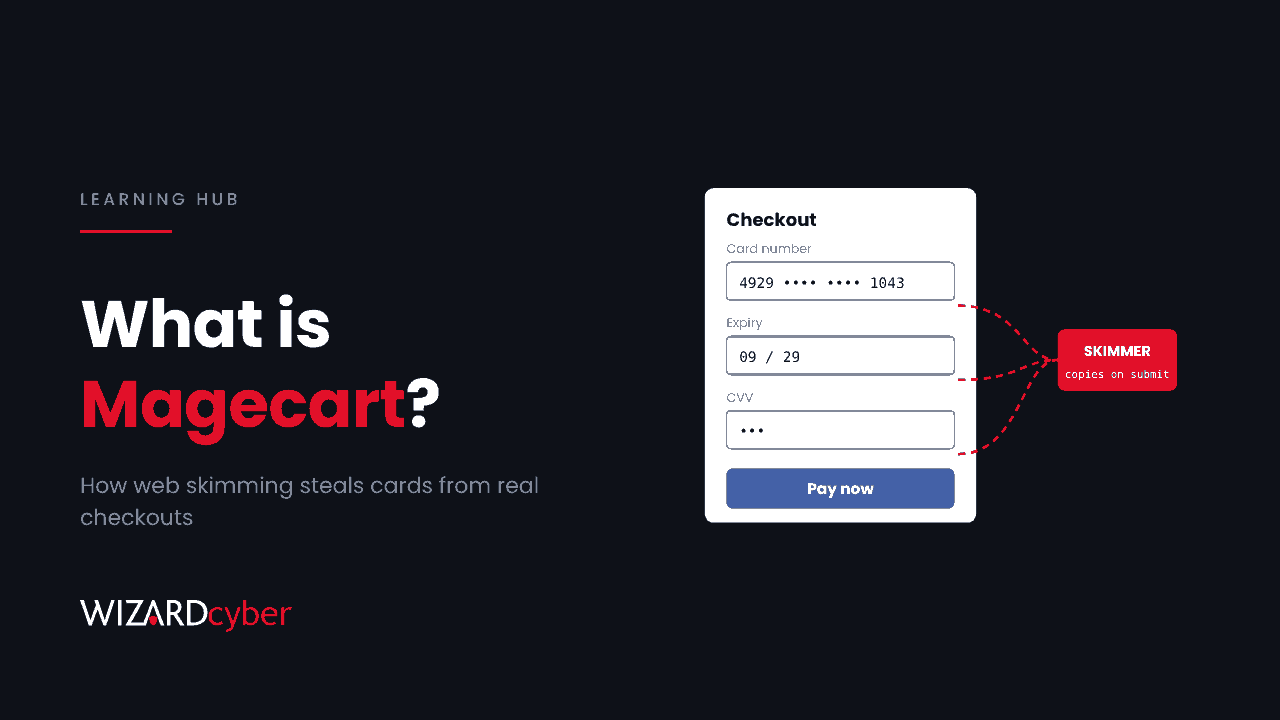
A Magecart attack is when criminals plant malicious JavaScript in a website so that it copies what visitors type, usually card numbers, expiry dates and security codes, and sends it to the attacker. The page still works and the payment still goes through, so neither the customer nor the business notices. The name comes from early campaigns against Magento shopping carts, but it is now used for any web skimming attack, on any platform. The same technique is also called formjacking or digital skimming.
How a Magecart attack works
Every web page you load runs JavaScript from several places: the site's own code, plus scripts for analytics, chat, advertising, consent banners and A/B testing. All of it runs in the visitor's browser with the same access to the page. A script added for analytics can read a card number field just as easily as the checkout code can.
A Magecart attack takes advantage of that in four steps:
- Get code onto the page. The attacker finds a way to add or change a script that the site loads (see the next section).
- Watch the form. The injected code listens for the customer typing or submitting payment fields, and sometimes login forms too.
- Copy the data. When the form is submitted, the code copies the values. The real submission carries on as normal, so the order completes.
- Send it out. The stolen data is sent to an attacker server, often on a domain made to look like an analytics or CDN service, or hidden in an image request.
Because nothing is installed on the customer's device and the site still works, a skimmer can run for weeks or months. Most are found by a bank spotting a pattern of fraud on cards used at one merchant, or by a researcher scanning sites, not by the site owner.
How attackers get the code in
Compromising the site itself
The classic route is a vulnerability in the e-commerce platform, a plugin or the server, or a stolen admin password. The attacker edits a template or a JavaScript file directly.
Compromising a third-party script
Instead of attacking one shop, the attacker compromises a supplier whose script is loaded by many sites: a chat widget, an analytics tag or a marketing tool. One change reaches every site that loads it. This is a supply chain attack on the browser.
The clearest recent example came on 16 November 2026, when malicious code was added to customer projects in a widely used website experimentation tool. Report URI found it on 188 project snippets across 178 organisations, served from the tool's own CDN. The script swapped cryptocurrency addresses, skimmed card details from sites' own payment fields, stole cookies and served iOS exploits to iPhone visitors. Our threat research write-up covers how to check whether your users were exposed.
Tag managers and admin consoles
Many marketing tools let a user publish JavaScript to the live site through a web console, without going through the development team or code review. An attacker with access to that console, through a stolen password or a flaw in the tool, has the same power.
Why it matters
- Regulatory exposure. Card data and personal data are both in scope. In the UK, the ICO fined an airline £20 million in 2020 after a 2018 skimming attack on its website and app affected hundreds of thousands of customers.
- PCI DSS. Version 4.0 of the card industry standard added two requirements aimed directly at this risk: 6.4.3 (keep an inventory of the scripts on payment pages, authorise each one and check its integrity) and 11.6.1 (detect unauthorised changes to payment pages). Both have been mandatory since 31 March 2025.
- Trust. Customers don't distinguish between your code and your supplier's. If their card is stolen on your checkout, it's your brand in the headlines.
How to protect your site
1. Know what runs on your pages
Build an inventory of every script on your payment and login pages: where it loads from, who owns it and why it's there. Remove anything nobody can justify. Fewer scripts on sensitive pages means fewer ways in.
2. Keep card fields out of your page
Use your payment provider's hosted fields or hosted payment page. Card data typed into the provider's iframe is out of reach of scripts on your page. In the November 2026 incident, the skimmer could read sites' own card fields but not hosted iframes.
3. Use a Content Security Policy, and read the reports
A Content Security Policy (CSP) is an HTTP header that tells the browser which domains a page may load scripts from and send data to. A strict policy blocks a skimmer's exfiltration request to an unknown domain. Just as useful, a policy in report mode tells you the moment a page tries to contact a domain that isn't on the list. Avoid allowances such as 'unsafe-eval' or 'unsafe-inline' where you can, because they let much injected code through.
4. Pin the scripts you control
Subresource Integrity (SRI) adds a hash to a script tag so the browser refuses to run the file if it changes. It works well for fixed library versions. It doesn't fit scripts that are designed to change, like tag managers or experimentation snippets, so those need tighter access control instead.
5. Lock down the consoles that can publish code
Treat any tool that can push JavaScript to your live site as privileged. Enforce single sign-on and MFA, keep the user list short, review API tokens, and turn on change history and alerts if the tool offers them.
6. Monitor the live page, not just the code
Your repository can be clean while the page in the browser isn't. Use a service or script that loads your checkout as a real browser would and alerts on new scripts or new outbound domains. Penetration tests of web applications should include the client side and third-party scripts, not only the server.
What to do if you find a skimmer
- Remove the code, and find out how it got there before assuming it's gone. Re-infection is common when the entry point stays open.
- Work out the exposure window from logs, change history and CSP reports.
- Tell your payment provider or acquirer, who will advise on card notification.
- Assess whether you need to report to the ICO. Personal data breaches must be reported within 72 hours of becoming aware where they're likely to put people at risk.
- Rotate any credentials for the platform, tag manager or supplier console that was used.
Frequently asked questions
Is Magecart a group or a technique?
Both, loosely. Researchers originally used the name for a set of criminal groups skimming card data from online shops. Today it's used for the technique in general, whoever is behind it.
Can antivirus on a customer's device stop it?
Usually not. The skimmer runs inside a legitimate website the customer chose to visit, so there's nothing on the device to flag. Protection has to happen on the site.
Does HTTPS protect against Magecart?
No. HTTPS encrypts traffic between the browser and the server. A skimmer reads the data inside the browser before it's sent, then sends its copy over HTTPS too.
Is it only a risk for shops?
No. Any page where people type something valuable is a target: login pages, account settings, donation forms and application forms. The November 2026 campaign also stole cookies and changed crypto addresses on sites that take no payments at all.
How do I check whether my own staff were affected by a skimmer on someone else's site?
Search your DNS, proxy and endpoint network logs for the attacker's domains during the exposure window. Then check which users and devices made those requests. Our write-up of the November 2026 campaign includes starting queries for Microsoft Defender and Sentinel.
How we help
Our offensive security team tests web applications from the attacker's side, including the scripts a page loads and the consoles that can change them. Our SOC watches for the network signs of skimming and other web supply chain attacks across your users' traffic, around the clock. If you'd like a review of what runs on your checkout today, talk to our team.