

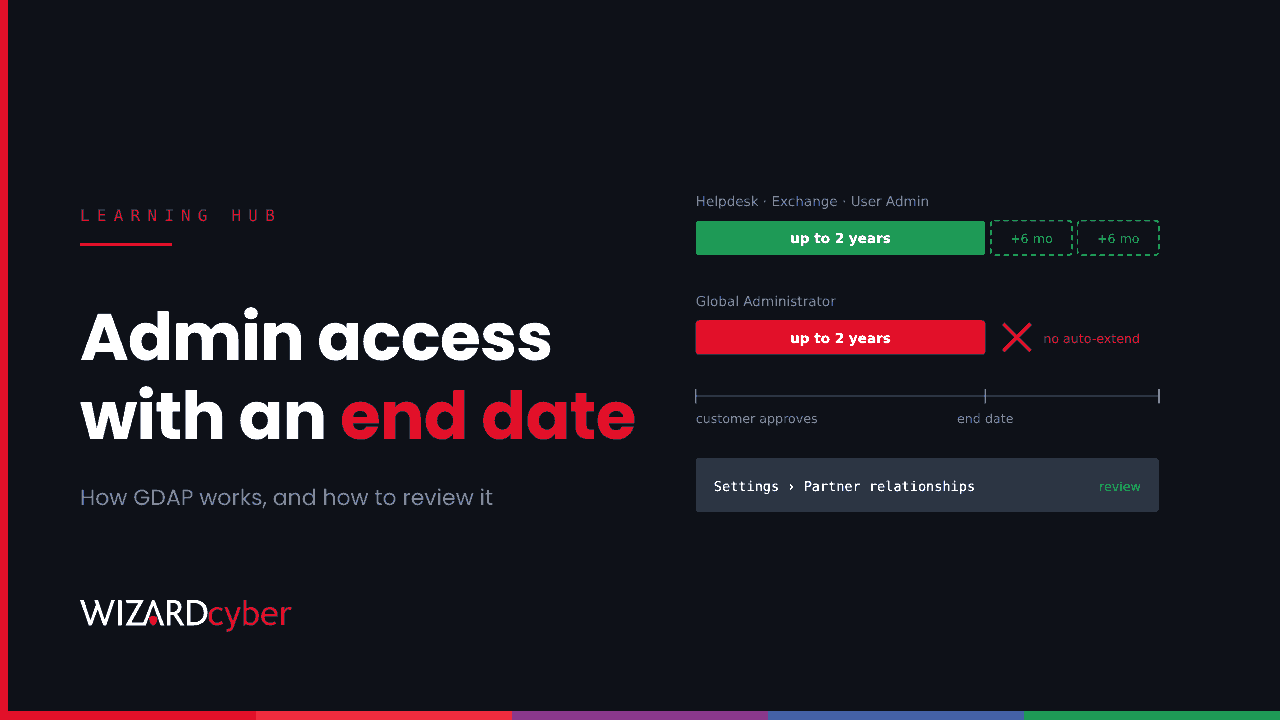
GDAP, or granular delegated admin privileges, is how a Microsoft partner gets admin access to a customer's Microsoft 365, Entra ID or Azure tenant. Instead of broad, permanent access, the partner asks for specific Microsoft Entra roles for a fixed period, the customer approves the request, and the partner assigns those roles to security groups of its own staff. Either side can end the relationship, and it expires after at most two years.
If you buy licences or managed services through a partner, you almost certainly have at least one GDAP relationship. This guide explains how GDAP works, how it differs from the older DAP model, and how to review and monitor the access partners hold in your tenant.
Why GDAP exists: the problem with DAP
Before GDAP, partners used delegated admin privileges (DAP). Accepting a DAP relationship gave the partner's "admin agents" Global Administrator rights in your tenant, with no end date. Anyone in that partner group could do anything in every customer tenant the partner managed.
That made partners a valuable target. Compromise one partner's admin account and you could reach all of its customers at once. Microsoft introduced GDAP to apply least privilege and Zero Trust principles to partner access, and has been moving partners off DAP since.
How GDAP works
- The partner creates a relationship request that lists the Entra roles it wants, such as Helpdesk Administrator or Exchange Administrator, and how long the relationship should last.
- The customer approves it. A Global Administrator in your tenant opens the request link and accepts it. A request that nobody acts on expires after 90 days.
- The partner assigns the roles to security groups in its own tenant. Only staff in those groups can use the roles in your tenant, and Microsoft allows up to 100 security groups per customer.
- Partner staff sign in to your tenant with their own accounts, from the partner's tenant, and act within the approved roles.
Time limits
A GDAP relationship can last up to two years, and permanent relationships aren't allowed. A partner or customer can turn on auto-extend, which adds six months at the end date until it is turned off or the relationship is ended. Auto-extend isn't available for a relationship that includes the Global Administrator role, so that one has to be requested again when it expires. All roles in one relationship expire at the same time.
Roles
The roles are standard Microsoft Entra roles. Microsoft recommends partners request the least-privileged role for each task, and advises against replacing Global Administrator with a request for every role available, which recreates the old problem.
GDAP vs DAP at a glance
- Scope: DAP gave Global Administrator. GDAP grants only the roles you approve.
- Duration: DAP had no end date. GDAP lasts up to two years.
- Who has access: DAP applied to the partner's whole admin agent group. GDAP applies only to the security groups the partner assigns.
- Customer control: Both can be removed by the customer, but GDAP gives you a clear list of roles to review and approve.
Why GDAP matters for your security
GDAP shrinks partner access, but it doesn't remove the risk. Partner accounts live in the partner's tenant, under the partner's MFA, device and offboarding controls, not yours. If a partner's account or app is compromised, the attacker inherits whatever you approved.
In November 2026, an operator used stolen app secrets at managed service providers, along with their delegated-admin apps and Partner Center tokens, to reach 27 organisations, many of them the providers' clients. Todyl's write-up is a good example of why partner access deserves the same review as your own admins. We discuss the governance side in Your Provider Has A Key To Your Tenant.
Two other points are easy to miss:
- GDAP isn't the only way a partner reaches your tenant. Multi-tenant apps the partner installed, guest accounts and remote management agents sit outside it. See our guide to service principals for the app side.
- Old DAP relationships may still exist in tenants that haven't been reviewed for a while. Remove any you find.
How to review your partners' access
- List your relationships. In the Microsoft 365 admin centre, go to Settings, then Partner relationships. For each partner, check whether it holds admin roles, which ones, and when the relationship ends.
- Match each role to real work. If a partner only handles licensing, it doesn't need admin roles. If it runs your help desk, it needs help desk roles, not Global Administrator.
- Remove what isn't needed. You can remove admin roles or end the relationship from the same page. The partner's security groups lose access to your tenant. Ending GDAP doesn't cancel your subscriptions or the reseller relationship.
- Check auto-extend. Decide whether each relationship should renew on its own, or come back to you for approval.
- Agree what happens at the end of a contract. Make removal of all roles, apps and accounts part of offboarding a supplier.
Conditional Access and partner users
Conditional Access can target partner staff. In a policy's user assignment, choose guest or external users and select the service provider users type. You can use this to require MFA or compliant sessions for partner sign-ins. Be careful with policies that block external users broadly, because they can block partner access too, and remember that an exclusion always wins over an inclusion.
Partner admins sign in through cross-tenant access, so they can't register their security information in your tenant. If you want to trust their MFA, configure that in your cross-tenant access settings for the partner's tenant.
Monitoring partner activity in Microsoft Sentinel
Partner sign-ins appear in your Entra sign-in logs with a home tenant that isn't yours. These queries are starting points to tune for your environment.
Sign-ins from service provider tenants
SigninLogs
| where TimeGenerated > ago(30d)
| where HomeTenantId != ResourceTenantId
| where CrossTenantAccessType == "serviceProvider"
| summarize SignIns = count(), Apps = make_set(AppDisplayName, 10),
            IPs = make_set(IPAddress, 20), Last = max(TimeGenerated)
          by HomeTenantId, UserPrincipalName, ResultType
Review which partner users sign in, from where, and to which apps. A new user or a new country from a partner tenant is worth a question.
Directory changes made by partner users
AuditLogs
| where TimeGenerated > ago(30d)
| extend Actor = tostring(InitiatedBy.user.userPrincipalName)
| where isnotempty(Actor)
| where not(Actor has_any ("yourdomain.com", "yourdomain.onmicrosoft.com"))
| project TimeGenerated, OperationName, Actor, Target = tostring(TargetResources[0].displayName), Result
| order by TimeGenerated desc
Replace the domains with your own. Pay most attention to role assignments, new app credentials and Conditional Access changes made by partner accounts.
Frequently asked questions
Is GDAP mandatory?
For partners who need admin access to customer tenants, GDAP is Microsoft's supported model, and DAP is being phased out.
How long does a GDAP relationship last?
Up to two years. With auto-extend turned on, it extends by six months at a time, except where it includes Global Administrator.
Can I remove a partner's GDAP access myself?
Yes. A Global Administrator can remove roles or end the relationship in the Microsoft 365 admin centre. Access stops for the partner's security groups, and your subscriptions aren't affected.
Does GDAP give the partner access to my Azure subscriptions?
It can. Partners who manage Azure are placed in a group that receives Owner rights on the customer's Azure subscriptions, so check Azure role assignments as well as Entra roles.
Can a partner see my data with GDAP?
That depends on the roles you approve. Exchange Administrator or SharePoint Administrator, for example, give broad control over mail and files. Approve only the roles the partner's work needs.
How Wizard Cyber helps
Our Microsoft security consultants can review every partner relationship, role and app in your tenant and help you reduce them to what each supplier needs. Our third-party risk management service checks the contracts and controls behind them, and our SOCs, staffed 24/7, watch partner sign-ins alongside your own users and apps.
If you'd like to know which partners hold admin roles in your tenant today, book a demo or talk to our team.