

This week a report alleged that a contractor connected a personal AI coding agent to a sensitive government network and gave it administrator rights. According to the report, the agent ran for about two months, wrote and committed code under the contractor's identity, and sent credentials and a network map to an outside website. The firm involved says an independent investigation found the allegations without merit, and the facts may never be settled in public.
For most organisations, the specific case matters less than the question it raises. If a supplier's engineer did the same thing in your tenant tomorrow, would anything you have in place notice?
The credentials are yours. The agent is not.
Most of what we have written about AI agents so far assumes the organisation chose the agent. Our posts on treating every AI agent as a new joiner and on what to do when an agent strays deal with agents you can register, scope and switch off.
This case is different. Nobody issued the agent an identity. It used a person's credentials, so to every log it looked like that person: same account, same group memberships, same Conditional Access result. Its commits carried their name, and its sign-ins passed their MFA because the person set it up. Your controls treated the agent as the person, because as far as they could tell it was.
That is why this is mainly a supplier problem and only partly an AI problem. You control your own staff's laptops and can block unsanctioned tools there. You probably do not control the laptop a contractor brings, or the tools on it.
Three places to look
1. The contract
Most supplier agreements cover confidentiality and acceptable use, and very few mention AI agents. Make it explicit:
- Supplier staff may not give any automated agent access to your systems or credentials without written approval.
- Any approved agent gets its own identity, not a person's, and is listed in your agent inventory.
- The supplier tells you within a set time if they find an agent has had access, whatever their own investigation concludes.
Add these to your supplier security questions as well. Ask what tools their engineers use, where those tools send data, and how the supplier would know. Our third-party risk work starts from questions like these.
2. The access
An agent can only do what the account it borrowed can do. The alleged case involved standing administrator rights, which is also the usual answer to "how bad could this get?"
- Give supplier accounts just-in-time privilege, not permanent admin roles.
- Require compliant or managed devices for privileged access, so a personal machine cannot hold an admin session.
- Keep secrets out of places a coding agent reads, such as repositories, scripts and config files, and rotate any that turn up there.
3. The behaviour
A person and an agent using the same account leave different marks. None of these signs proves an agent was there, but together they are worth a question:
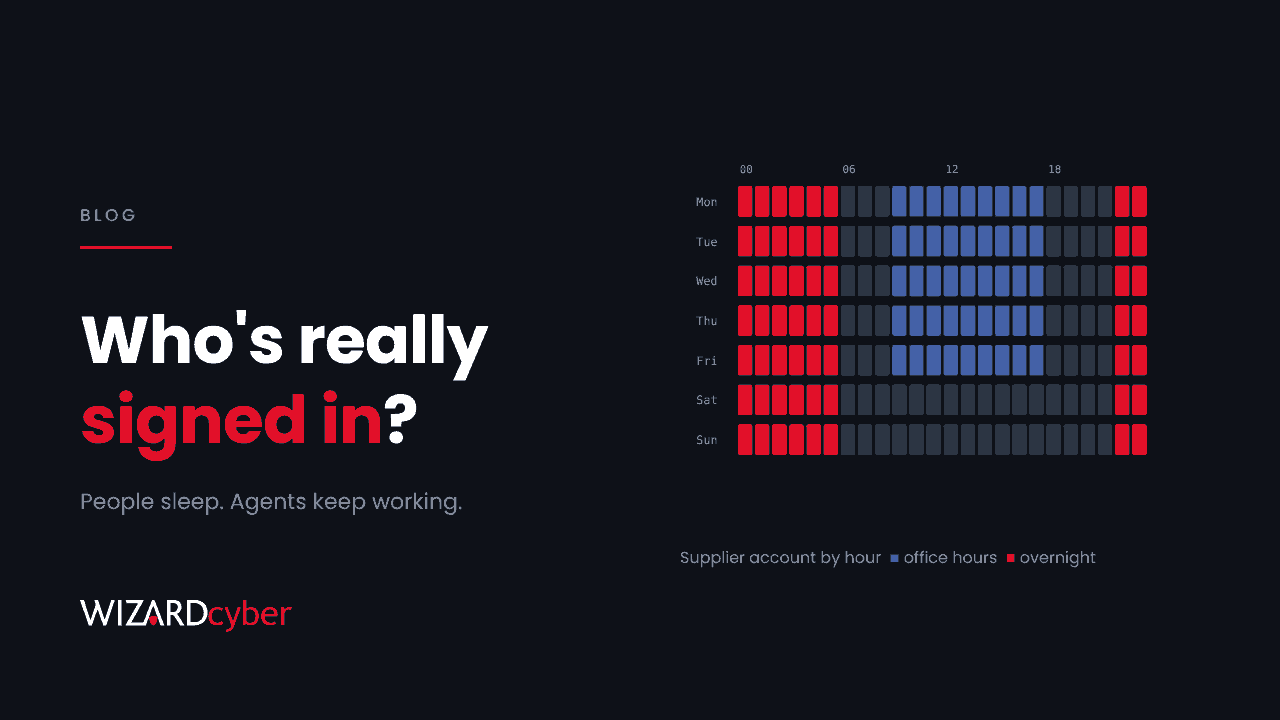
- Working hours that never end. People sleep, and agents keep working through the night. A supplier account committing code or running admin commands at 03:00 every night for weeks is unusual.
- Speed. Dozens of changes, queries or file reads in a minute, at a steady rhythm, rarely come from someone typing.
- New tooling on the session. Unfamiliar user agents, command-line clients or API calls from an account that normally only uses the portal.
- Data leaving to odd places. Credentials, configuration files or diagrams posted to a web service your organisation does not use.
Each of these is visible in Entra sign-in logs, audit logs and endpoint telemetry if someone is looking. Most organisations collect the logs, but fewer have anyone reviewing supplier accounts against them.
What we would do this month
- List every supplier account with standing privilege and remove what is not needed.
- Add an AI agent clause to your next supplier contract renewal and to your security questionnaire.
- Baseline supplier activity by hour. A simple chart of activity per account per hour shows which ones never stop.
- Decide who gets the call. If you find an agent on a supplier account, someone needs authority to suspend that account immediately, even if the supplier objects.
Where a SOC fits
Contracts set expectations, and controls limit the damage. Detection is how you find out the other two did not work. Our SOCs are staffed 24/7, and every investigation produces a full report and a closing statement, with senior analyst sign-off by default on the managed service. Supplier accounts are investigated with the same attention as everyone else's. Agent or not, an account working all night at machine speed gets a question and a decision.
If you want help finding out which of your suppliers' accounts would pass that test, talk to our team.