

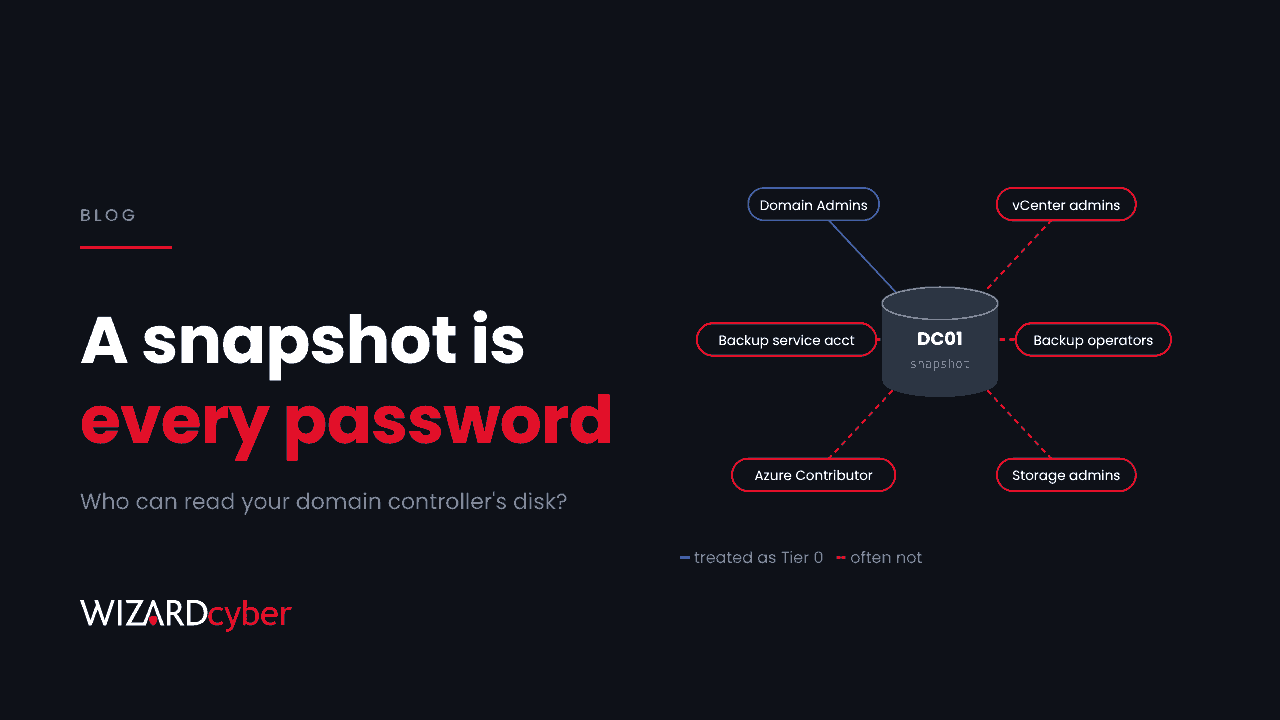
Most organisations we talk to have thought hard about who can be a domain admin. Far fewer have asked who can read a domain controller's disk. They should, because the answer is the same thing. Anyone who can copy a domain controller's virtual disk, snapshot or backup holds a copy of NTDS.dit and the registry key that unlocks it, and with them the password hash of every account in the domain.
A reminder from this week
On 10 November Recorded Future published research on GhostFrame, an implant for VMware ESXi linked to a ransomware group. Once it has root on a host, it can scan every virtual machine on a datastore, read snapshots and virtual disks, and extract NTLM hashes, Kerberos tickets and NTDS.dit data. Nothing runs inside the domain controller. There is no LSASS dump for Defender to catch and no replication request for Defender for Identity to flag. The domain is gone, and the domain controller's own logs show a quiet day.
Our threat research write-up covers how to hunt for it. This post is about the design decision underneath it.
Tiering usually stops at the directory
The tiered admin model puts domain controllers and the accounts that control them in Tier 0, and keeps those accounts away from ordinary servers and workstations. Most mature estates have some version of it. The gap is in what counts as "controlling" a domain controller. The usual list is Domain Admins, Enterprise Admins, the built-in Administrators group and a few delegated rights. In practice that list is much longer:
- Hypervisor administrators. vCenter and ESXi admins can snapshot a domain controller, attach its disk to another VM, or browse and download the files from the datastore.
- Backup operators and backup service accounts. A backup of a domain controller is a domain controller at rest. Whoever can restore it to an isolated network, or mount it, can read it. So can whoever can reach the backup repository.
- Storage administrators. SAN snapshots and replicated volumes carry the same data one layer further down.
- Cloud roles. If your domain controllers run in Azure, anyone with rights to snapshot or export their managed disks, or to use Run Command on the VM, has the same reach. Those rights often come with broad Contributor roles granted for convenience.
- The management plane itself. If vCenter or the backup console signs in against the same Active Directory it is protecting, a compromise of that directory hands the attacker the tools to cover their tracks, and the reverse is also true.
Every one of these is a route to every password in the domain. In many estates, none of them is managed like one. Hypervisor admin accounts are shared, backup service accounts haven't changed password in years, and the management interfaces are reachable from the same networks as everything else.
What we'd change
None of this needs new products. It needs a wider definition of Tier 0 and the discipline to apply it.
- List every copy. Write down where each domain controller's disks, snapshots, replicas and backups live, and who can read each of them. Include the cloud and any offsite or immutable backup copies.
- Move those people and accounts into Tier 0. That means named accounts, phishing-resistant MFA, privileged access workstations, and no day-to-day use. Our guide to privileged access management covers just-in-time access, which suits roles that rarely need to touch a domain controller.
- Separate the management plane. Keep hypervisor and backup management on a dedicated network, and avoid authenticating it against the domain it protects. If it must use AD, use a separate admin forest or at least separate, tightly held accounts.
- Consider dedicated hosts. Running domain controllers on a small, separate cluster with its own administrators shrinks the group of people who can reach them. Physical domain controllers do the same.
- Watch for snapshots and exports. A snapshot of a domain controller outside the backup window, a disk export in Azure, or a restore to an unusual location should raise an alert, not just a log entry. The same goes for interactive shell access on a hypervisor.
- Plan for the bad day. If a copy of a domain controller leaves your control, every password in the domain has to be treated as known. Your incident plan should already say who resets the
krbtgtaccount twice, how service accounts are rotated without an outage, and how long it takes.
The wider pattern
This is the third time in a few weeks we've written about a system that sits outside the identity tiers but can act as if it were inside them. First it was developer workstations, then appliance service accounts that could read LAPS passwords. The lesson is the same each time. Tier 0 isn't a list of groups in Active Directory. It is everything that can produce the result a domain admin can, and the attacker only needs one of those routes.
How we help
Our Microsoft security consultancy works through exactly this kind of review: who can reach what, and whether the controls match. Once the boundary is drawn, our SOCs, staffed 24/7, watch it. On the managed service, connectors, parsers and analytical rules for the rest of your estate, including the platforms your domain controllers run on, are built at onboarding.
If you aren't sure who can read your domain controllers' disks today, talk to our team.