

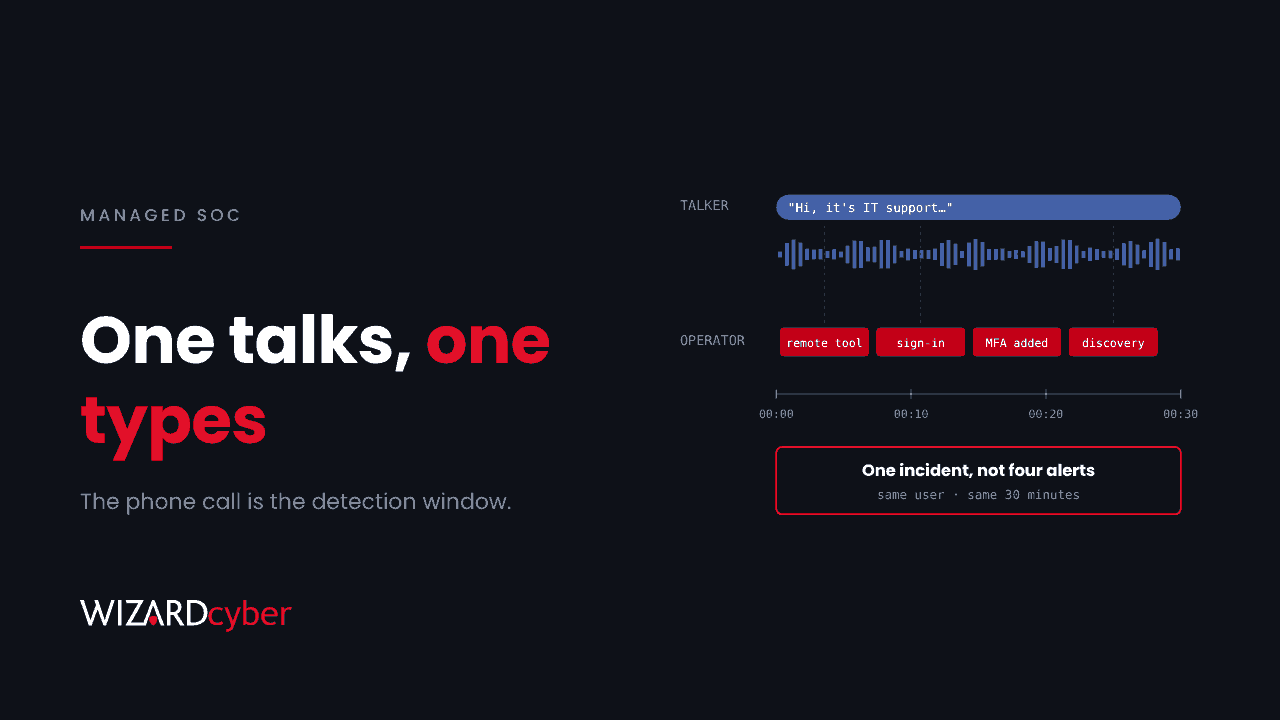
On 18 November, Ukraine's acting police chief described how a ransomware crew his officers had just raided with the FBI got into its victims. They phoned an employee and posed as IT support. In his words, as reported by Censor.NET, "while one attacker kept him on the line, the other entered the corporate system". The call ended only once the break-in was confirmed.
That one sentence describes an attack most security programmes still treat as a training problem. My view is that it's a detection problem too, and the phone call is where it can be caught.
What the police described
From the police chief's account and Help Net Security's report:
- At least 28 companies paid more than $40.5 million in ransom. Police say the final figure is still being established.
- Targets included oil and gas, pharmaceuticals, manufacturing, logistics, financial services and infrastructure. One US company lost 1.4 TB of data and paid $5 million after a $10 million demand.
- The group researched each target's finances, staff and IT weaknesses before calling.
- Staff were talked into handing over their credentials or installing remote access software.
- The group built its own platform to automate calls with AI-generated voice messages.
- Its core had at least 27 members, with links to a wider network of more than 60 people in eight jurisdictions, some of them former members of the Conti ransomware group.
- Police carried out 66 searches, and four key members are in custody.
The police haven't named the remote access tools or the ransomware involved. They don't need to, because the method is the point.
Two people, one intrusion
The split between talker and operator is what makes this effective. The person on the phone handles the human side: urgency, reassurance, and "can you just click allow for me?". The operator uses whatever access that conversation produces, straight away, while the victim is still on the line and still co-operating. If an MFA prompt appears, the talker explains it away. If the remote session needs approving, the talker walks the user through it.
Arrests remove one crew. The method was already in use well before this operation. We've written about help desk impersonation over Teams and about a case where a single call led to a domain controller certificate. AI voice tooling makes the first call cheaper to place, so expect more of these calls, not fewer.
Security awareness training tells people to hang up. Detection has to assume that sometimes they won't.
The call is the detection window
Each step of this attack leaves something a SOC can see, and the events land close together:
- The set-up. This is often an inbox flood or a burst of spam, which gives the "IT support" call its pretext.
- The handover. A remote access tool is installed or launched by a user who has never run one, or a built-in tool such as Quick Assist is used outside the help desk's normal pattern.
- The sign-in. The user's account signs in from a new device, location or ASN, often minutes after the remote session starts. Or a new MFA method is registered.
- The operator's first moves. Discovery commands, a new scheduled task, or a second remote tool for persistence appear while the user is still on the phone.
On its own, each of those can look routine. Seen together within half an hour on the same identity, they're an intrusion in progress. The response has to happen within the same window. A ticket picked up the next morning arrives after the attacker has already encrypted the network.
What to put in place
On the help desk side
- Tell staff how IT will contact them, and how it won't. If your help desk never calls first to "fix" something, say so plainly and often. Then anyone who gets a call has a simple test.
- Give staff a call-back route. Encourage them to hang up and ring the published help desk number. Make it normal, not rude.
- Have one approved remote support tool. Block or alert on the others. Our explainer on RMM tools covers how to spot rogue agents.
- Verify the person when the help desk takes inbound calls. Password and MFA resets should need more than a name and a manager's name, both of which a researched attacker will already know.
On the detection side
- Correlate the sequence, not single events. A remote tool launch, a risky sign-in and an MFA registration on the same user within a short window should be one incident.
- Protect MFA registration. Require a compliant device or trusted location for registering security information, so a talked-through user can't add the attacker's method.
- Have a fast containment path. Agree in advance who can isolate a device or disable an account in the middle of the night, so the response isn't waiting on a sign-off.
Here's a starting query for Microsoft Sentinel that brings the first two signals together. Tune the tool list and time window to your estate:
let RemoteTools = dynamic(["quickassist.exe","anydesk.exe","screenconnect.clientservice.exe",
                           "teamviewer.exe","rustdesk.exe"]);
let Launches = DeviceProcessEvents
| where Timestamp > ago(7d)
| where FileName in~ (RemoteTools)
| project LaunchTime = Timestamp, DeviceName, User = tolower(AccountUpn), Tool = FileName;
SigninLogs
| where TimeGenerated > ago(7d)
| where RiskLevelDuringSignIn in ("medium","high") or RiskState == "atRisk"
| project SigninTime = TimeGenerated, User = tolower(UserPrincipalName), IPAddress, Location
| join kind=inner Launches on User
| where SigninTime between (LaunchTime .. LaunchTime + 30m)
| project User, Tool, DeviceName, LaunchTime, SigninTime, IPAddress, Location
Where a SOC fits
This crew ended each call only after confirming it was in, which means it moved at the speed of a phone conversation. Defenders need to work on the same timescale.
Our SOCs are staffed 24/7. CYBERSHIELD AI's Investigation Agent works each incident through to a verdict, averaging 3m 30s, or 7m 50s where it needs Advanced Investigation, and groups related incidents into one case, so a remote session and a sign-in on the same user are looked at together. Close-or-escalate decisions follow policy and your own decision templates, and senior analyst sign-off is the default on the managed service.
If you want to know how your estate would handle a call like this, talk to us or book a demo.